
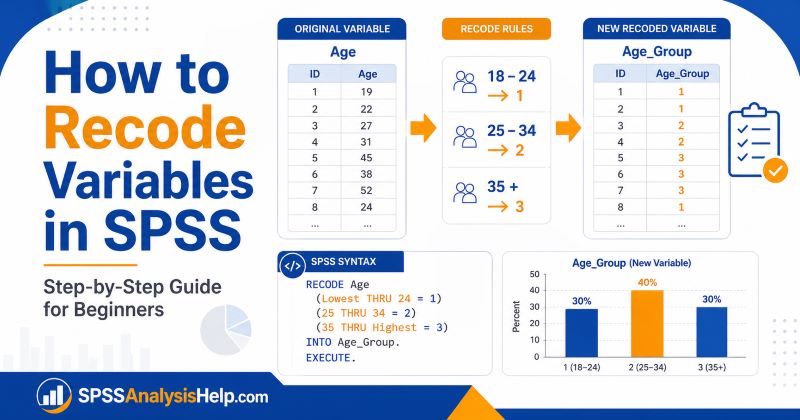
Recoding variables is one of the most common data preparation tasks in SPSS. If your dataset has survey responses, age values, income groups, gender codes, education levels, or Likert-scale items, you may need to recode some variables before analysis.
For example, you may want to group ages into categories, combine several response options, reverse-code negatively worded survey items, or change text responses into numeric codes. These changes help make your data easier to analyze and interpret.
This guide explains how to recode variables in SPSS step by step. You will learn the difference between recoding into the same variable and recoding into a different variable. You will also see practical examples, syntax, value labels, common mistakes, and ways to check whether your recoding worked correctly.
If you are still learning the full SPSS workflow, you may also find this guide on how to use SPSS for data analysis helpful.
What Does It Mean to Recode Variables in SPSS?
To recode variables in SPSS means to change existing values into new values. The original values may be numbers, categories, ranges, or text responses. The new values are usually created to make the variable easier to analyze.
For example, suppose your survey has a variable called age. The values may be exact ages such as 18, 22, 29, 35, and 47. If you want to compare age groups, you can recode the exact ages into categories, as shown below.
| Original Age | New Code | New Category |
|---|---|---|
| 18–24 | 1 | 18 to 24 |
| 25–34 | 2 | 25 to 34 |
| 35 and above | 3 | 35 and above |
Recoding is also useful when you want to combine response categories. For example, a five-point Likert scale can be recoded into three groups: disagree, neutral, and agree.
The main idea is simple. You are telling SPSS how old values should be converted into new values.
Why Recoding Variables Matters in SPSS
Recoding variables helps you prepare your dataset for the correct analysis. Many statistical tests require variables to be arranged in a specific way. If your coding is unclear, inconsistent, or too detailed, your results may be difficult to interpret.
For example, a chi-square test of independence needs categorical variables. If age is recorded as exact numbers, you may need to recode it into age groups before using it in a crosstab. In regression analysis, you may need to recode categorical variables into dummy variables. In survey research, you may need to reverse-code some items before creating a total score.
Recoding also makes tables easier to read. Instead of reporting many small categories, you can group related responses into meaningful categories.
However, recoding must be done carefully. A poor recode can change the meaning of your data. That is why you should always check the original values, plan your new categories, and confirm the results after recoding.
If you are preparing data for a dissertation, thesis, or research project, accurate coding is very important. Our SPSS dissertation services support students who need help with data coding, recoding, analysis, and interpretation.
When Should You Recode Variables in SPSS?
You should recode variables when the current values do not match your analysis plan. Recoding is usually done during data preparation, before running the main statistical tests.
Common reasons for recoding include:
- Creating groups from continuous values. For example, recoding age into age groups.
- Combining small categories. For example, combining rare education levels into broader groups.
- Reverse-coding Likert-scale items. This is common when some survey questions are negatively worded.
- Creating binary variables. For example, changing several categories into yes/no or 0/1 values.
- Changing text categories into numbers. For example, recoding “Male” and “Female” into numeric codes.
- Preparing variables for crosstabs. Categorical variables are easier to compare after clear recoding.
- Cleaning inconsistent coding. For example, fixing values coded as 1, 2, 99, or blank.
Recoding is not something you do randomly. Each new code should have a clear reason. Before you recode, ask yourself: “What will this new variable help me analyze?”
Recode Into Same Variables vs Recode Into Different Variables
SPSS gives you two main recoding options:
- Recode into Same Variables
- Recode into Different Variables
These options sound similar, but they are very different.
Recode Into Same Variables
This option replaces the original values in the same variable. For example, if you recode gender, the old values inside gender are changed permanently in the active dataset.
This option can be risky because it removes the original coding. If you make a mistake, you may not be able to compare the new values with the original values unless you have a backup copy.
Recode Into Different Variables
This option creates a new variable while keeping the original variable unchanged. For example, you can recode age into a new variable called age_group.
This is usually the better option for students and researchers. It allows you to keep the original data and create a new version for analysis.
For most academic projects, use Recode into Different Variables unless you have a clear reason to overwrite the original variable. This is also consistent with good SPSS practice.
Before You Recode: Check Your Variable First
Before you recode any variable in SPSS, you should first understand how it is currently coded. This helps you avoid errors and decide the correct recoding rules.
Start by checking whether the variable is numeric or a string. Numeric variables use numbers such as 1, 2, 3, or 4. String variables use text such as “Male,” “Female,” “Yes,” or “No.”
Next, check the value labels. A variable may show labels in Data View, but SPSS may store numbers behind those labels. For example, SPSS may display “Male” and “Female,” but the actual values may be 1 and 2.
You should also check missing values. Some datasets use codes such as 99, 999, or -1 to represent missing data. If you do not handle these correctly, SPSS may treat them as valid responses.
A simple way to inspect a variable is to run Frequencies using the following menu.
Analyze → Descriptive Statistics → Frequencies
Look at the values, labels, counts, and missing cases. This gives you a clear picture before you begin recoding.
Example Dataset Used in This Guide
To make the steps easier to follow, we will use a simple example.
Suppose you have a variable called age. This variable contains the exact ages of respondents in a survey. You want to create a new variable called age_group.
The goal is to recode age into three categories:
| Age Range | New Code | New Value Label |
|---|---|---|
| 18 to 24 | 1 | 18 to 24 |
| 25 to 34 | 2 | 25 to 34 |
| 35 and above | 3 | 35 and above |
This type of recoding is useful when you want to compare groups. For example, you may want to compare whether the age group is related to preferred learning method, product choice, job satisfaction, or survey response.
The same idea can be applied to many other variables. You can recode income into income groups, test scores into performance levels, or years of experience into experience categories.
How to Recode Variables in SPSS Using the Menu
The easiest way to recode variables in SPSS is through the menu. This method is beginner-friendly because you do not need to write syntax.
Follow these steps:
- Open your dataset in SPSS.
- Go to Transform in the top menu.
- Select Recode into Different Variables.
- Move the variable you want to recode into the input box.
- Type a name for the new variable.
- Type a label for the new variable if needed.
- Click Change.
- Click Old and New Values.
- Enter each old value, range, or category.
- Enter the matching new value.
- Click Add after each recoding rule.
- Click Continue.
- Click OK.
SPSS will create a new variable at the end of your dataset. This new variable will contain the recoded values.
Remember to click Change after naming the new variable. Many beginners forget this step. If you forget it, SPSS may not create the new variable correctly.
Step-by-Step Example: Recode Age Into Age Groups
Let us now use the exact SPSS steps to recode age into a new variable called age_group.
In this example, we want to recode exact ages into three groups:
| Age Range | New Code | New Label |
|---|---|---|
| 18 to 24 | 1 | 18 to 24 |
| 25 to 34 | 2 | 25 to 34 |
| 35 and above | 3 | 35 and above |
Step 1: Open the Recode Dialog Box
Go to the top menu in SPSS and click:
Transform → Recode into Different Variables
This option is safer than recoding into the same variable because it keeps the original age variable unchanged.
Step 2: Move the Variable Into the Input Box
In the left-hand list of variables, select age.
Click the arrow button to move it into the Input Variable → Output Variable box.
This tells SPSS that age is the variable you want to recode.
Step 3: Name the New Variable
In the Output Variable section, type the name of the new variable.
Use: age_group
In the label box, you can type: Age group of respondent
A clear variable name helps you recognize the new variable later in Data View and Variable View.
Step 4: Click Change
After entering the new variable name and label, click Change.
This step is very important. If you do not click Change, SPSS may not apply the output variable name correctly.
You should now see something like:
age → age_group
This means SPSS understands that the old variable age will be recoded into the new variable age_group.
Step 5: Click Old and New Values
Click Old and New Values.
This opens the dialog box where you tell SPSS how the old age values should be converted into new group codes.
Step 6: Enter the Old Values and New Values
Now enter the recoding rules one at a time.
For the first group:
- Under Old Value, choose Range
- Enter
18through24 - Under New Value, enter
1 - Click Add
For the second group:
- Under Old Value, choose Range
- Enter
25through34 - Under New Value, enter
2 - Click Add
Finally, for the third group:
- Under Old Value, choose Range, value through HIGHEST
- Enter
35 - Under New Value, enter
3 - Click Add
Your recoding rules should now look like this:
| Old Value Rule | New Value |
|---|---|
| 18 through 24 | 1 |
| 25 through 34 | 2 |
| 35 through highest | 3 |
Step 7: Click Continue and OK
After entering all the rules, click Continue.
Then click OK in the main recode dialog box.
SPSS will create a new variable called age_group at the end of your dataset.
Step 8: Check the New Variable
After recoding, check whether the new variable was created correctly.
In SPSS
Go to: Analyze → Descriptive Statistics → Frequencies
Move age_group into the variable box and click OK.
You should see the new categories coded as 1, 2, and 3. If you added value labels, SPSS will show the labels as:
- 18 to 24
- 25 to 34
- 35 and above
You can also compare the original age variable with the new age_group variable using Crosstabs. This helps confirm that each age value was placed in the correct group.
How to Add Value Labels After Recoding
After recoding, your new variable may show numbers such as 1, 2, and 3. These numbers are useful for SPSS, but they are not clear enough for interpretation. You should add value labels so that each number has a meaning.
Go to Variable View and find your new variable, such as age_group.
In the Values column, click the small button. Then add the following labels:
| Value | Label |
|---|---|
| 1 | 18 to 24 |
| 2 | 25 to 34 |
| 3 | 35 and above |
Click Add after each label. Then click OK.
Now, when you view the data, SPSS can display the category names instead of only numbers.
You should also check the Measure column. If the categories have a meaningful order, such as age groups or education levels, set the measure to Ordinal. If the categories have no natural order, such as gender or department, set the measure to Nominal.
This small step makes your dataset easier to understand and reduces mistakes later.
How to Recode Categorical Variables in SPSS
Sometimes you need to recode categorical variables by combining several categories into fewer groups.
Suppose you have an education variable coded like this:
| Original Code | Original Label |
|---|---|
| 1 | Primary |
| 2 | Secondary |
| 3 | College |
| 4 | University |
You may want to create a new variable with only two categories:
| Original Codes | New Code | New Label |
|---|---|---|
| 1 and 2 | 1 | Lower education |
| 3 and 4 | 2 | Higher education |
To do this in SPSS, go to:
Transform → Recode into Different Variables
Move the education variable into the input box. Name the new variable something clear, such as education_group.
In Old and New Values, recode:
- 1 = 1
- 2 = 1
- 3 = 2
- 4 = 2
After that, add value labels to the new variable. Label 1 as “Lower education” and 2 as “Higher education.”
This method is useful when some original categories are too small for meaningful analysis.
How to Recode a Continuous Variable Into Categories
A continuous variable contains numeric values measured on a scale. Examples include age, income, exam score, working hours, and years of experience.
Sometimes you may need to convert a continuous variable into categories. For example, you may recode exam scores into performance levels.
| Score Range | New Code | New Category |
|---|---|---|
| 0 to 49 | 1 | Low |
| 50 to 69 | 2 | Moderate |
| 70 to 100 | 3 | High |
To do this, use Recode into Different Variables.
In Old and New Values, use ranges:
- 0 through 49 = 1
- 50 through 69 = 2
- 70 through 100 = 3
Then add value labels to the new variable.
Be careful when creating categories from continuous data. Grouping can make interpretation easier, but it can also reduce detail. If your analysis requires the original continuous values, keep the original variable and create a separate grouped variable.
This is why recoding into a different variable is usually safer than replacing the original values.
How to Recode Likert Scale Variables in SPSS
Likert-scale items are common in survey research. They often use values such as:
| Value | Label |
|---|---|
| 1 | Strongly disagree |
| 2 | Disagree |
| 3 | Neutral |
| 4 | Agree |
| 5 | Strongly agree |
Sometimes you may want to combine these responses into fewer categories.
For example:
| Original Values | New Code | New Label |
|---|---|---|
| 1 and 2 | 1 | Disagree |
| 3 | 2 | Neutral |
| 4 and 5 | 3 | Agree |
This can make results easier to present in tables or charts.
To do this in SPSS, recode the original Likert variable into a new variable. Then assign value labels to the new variable.
However, do not group Likert responses unless it makes sense for your research question. If you are calculating scale scores, you may need to keep the original values instead.
If you are working on survey data and are unsure how to prepare your variables, our SPSS data analysis help service can support you with cleaning, coding, analysis, and interpretation.
How to Reverse Code Likert Scale Items in SPSS
Reverse coding is needed when a survey item is worded in the opposite direction from the other items.
For example, suppose most items measure satisfaction positively:
- “I am satisfied with my job.”
- “I enjoy working with my team.”
But one item is negative:
- “I often feel unhappy at work.”
If all items are used to create one satisfaction score, the negative item must be reverse-coded first.
For a five-point scale, reverse coding usually looks like this:
| Original Value | Reverse-Coded Value |
|---|---|
| 1 | 5 |
| 2 | 4 |
| 3 | 3 |
| 4 | 2 |
| 5 | 1 |
In SPSS, go to:
Transform → Recode into Different Variables
Move the original item into the input box. Create a new variable such as item3_reverse.
In Old and New Values, enter:
- 1 = 5
- 2 = 4
- 3 = 3
- 4 = 2
- 5 = 1
After recoding, check frequencies to confirm the values changed correctly.
How to Recode String Variables Into Numeric Variables
A string variable contains text instead of numbers. For example, a gender variable may contain values such as “Male” and “Female” instead of 1 and 2.
SPSS can analyze some string variables in limited ways, but numeric coding is often better for statistical analysis.
Example:
| Original String Value | New Numeric Code | Value Label |
|---|---|---|
| Male | 1 | Male |
| Female | 2 | Female |
| Prefer not to say | 3 | Prefer not to say |
To recode a string variable into a numeric variable, use:
Transform → Automatic Recode
This option automatically converts string categories into numeric codes.
After using Automatic Recode, check the new variable carefully. SPSS may assign codes alphabetically or based on the order found in the dataset. You should review the coding and value labels before using the variable in analysis.
If you need full control over how each string category is coded, you can also create a new numeric variable and define the coding manually.
How to Recode Variables in SPSS Using Syntax
SPSS syntax allows you to recode variables using commands. This is useful because syntax creates a record of what you did. It also helps when you need to repeat the same process later.
Here is an example of recoding age into age groups:
RECODE age
  (18 THRU 24 = 1)
  (25 THRU 34 = 2)
  (35 THRU HI = 3)
  INTO age_group.
EXECUTE.
This command tells SPSS to create a new variable called age_group.
You can then add value labels:
VALUE LABELS age_group
  1 '18 to 24'
  2 '25 to 34'
  3 '35 and above'.
EXECUTE.
You can also assign a variable label:
VARIABLE LABELS age_group 'Age group of respondent'.
EXECUTE.
Syntax may look difficult at first, but it is very useful. It helps you avoid forgetting what changes you made to your dataset.
How to Use ELSE = COPY When Recoding
When you recode into a new variable, you should tell SPSS what to do with values that are not listed in your recoding rules.
For example, suppose you recode only values 1 and 2. If your variable also has values 3, 4, and 5, SPSS may set the unlisted values as missing in the new variable.
To avoid this, you can use ELSE = COPY.
Example:
RECODE satisfaction
  (1 = 1)
  (2 = 1)
  (ELSE = COPY)
  INTO satisfaction_new.
EXECUTE.
This tells SPSS to recode values 1 and 2, but keep all other values the same.
This is helpful when you only want to change selected values. However, do not use ELSE = COPY blindly. Make sure it fits your recoding plan.
If you want all unmentioned values to become missing, then you should not copy them. The correct choice depends on your research goal.
How to Check Whether Recoding Worked Correctly
After recoding, do not move straight to analysis. Always check whether the new variable was created correctly.
The easiest method is to run Frequencies for the new variable:
Analyze → Descriptive Statistics → Frequencies
Check the values, labels, valid cases, and missing cases.
You can also compare the old and new variables using Crosstabs:
Analyze → Descriptive Statistics → Crosstabs
Place the original variable in one box and the recoded variable in the other box. This helps you see whether each original value was assigned to the correct new category.
For example, if you recoded age into age groups, a crosstab can show whether ages 18 to 24 were placed into group 1, ages 25 to 34 into group 2, and ages 35 and above into group 3.
You can also use syntax:
CROSSTABS
  /TABLES=age BY age_group
  /CELLS=COUNT.
This step is important. Many SPSS errors happen because users recode variables but never check the new values.
Recode vs Compute Variable in SPSS
Many beginners confuse Recode with Compute Variable. Both are found under the Transform menu, but they are used for different tasks.
Use Recode when you want to change existing values into new categories or codes and Compute Variable when you want to calculate a new variable using a formula.
| Task | Best Option |
|---|---|
| Change age into age groups | Recode |
| Combine Likert responses into fewer groups | Recode |
| Reverse-code a Likert item | Recode or Compute |
| Calculate total score from several items | Compute Variable |
| Calculate mean scale score | Compute Variable |
| Create BMI from height and weight | Compute Variable |
| Convert income into income groups | Recode |
For example, if you want to turn exact ages into age groups, use Recode. If you want to add five questionnaire items to create a total score, use Compute Variable.
Understanding this difference helps you choose the right SPSS tool.
Common Mistakes When Recoding Variables in SPSS
Recoding is simple, but it can easily lead to errors if you are not careful.
Here are common mistakes to avoid:
- Recoding into the same variable without a backup. This can overwrite your original data.
- Forgetting to click Change. SPSS may not create the new variable correctly.
- Not adding value labels. The new variable may show numbers without meaning.
- Ignoring missing values. Codes such as 99 or 999 may be treated as real data.
- Leaving some values unassigned. Unlisted values may become missing.
- Using unclear variable names. Names such as
newvar1can confuse you later. - Recoding before checking frequencies. You may miss unexpected values.
- Creating categories without a reason. Recoding should match your research question.
These mistakes can affect your results. They may also make your output harder to interpret. For more practical errors to avoid, read our guide on common SPSS analysis mistakes.
Best Practices for Recoding Variables in SPSS
Good recoding starts with a clear plan. Do not change values just because SPSS allows you to do so. Each recode should support your research question or analysis method.
Use these best practices:
- Keep the original variable unchanged.
- Use Recode into Different Variables when possible.
- Give the new variable a clear name.
- Add variable labels and value labels.
- Check frequencies before and after recoding.
- Document your recoding rules.
- Use syntax when working on important projects.
- Save a backup copy of your dataset.
- Check missing values before analysis.
- Make sure your recoded categories make statistical and practical sense.
For example, if you recode age into groups, explain why those groups were chosen. Were they based on theory, previous research, sample distribution, or assignment instructions?
Clear documentation is especially important in dissertations and research projects. Your supervisor or reader should be able to understand how the final variables were created.
Should You Always Recode Variables?
No. You should not recode variables unless there is a clear reason.
Recoding can make data easier to analyze, but it can also remove useful detail. For example, age as a continuous variable gives more information than broad age groups. If you recode age into only three categories, you lose some precision.
This does not mean recoding is wrong. It only means you should think carefully before doing it.
Ask yourself these questions:
- Does my analysis require categories?
- Do my research questions compare groups?
- Are the categories meaningful?
- Will recoding improve interpretation?
- Am I losing important information?
- Can I explain why I created these groups?
If the answer is clear, recoding may be useful. If not, you may be better off keeping the original variable.
For academic projects, the safest approach is to keep both versions. Keep the original variable and create a new recoded variable for analysis.
Getting Help With Recoding Variables in SPSS
Recoding may look simple, but it can affect your entire analysis. If variables are coded incorrectly, your statistical tests, tables, and interpretation may also be wrong.
This is especially important in dissertations, theses, research papers, and data analysis assignments. A small coding mistake can lead to incorrect conclusions.
At SPSSAnalysisHelp.com, we help students and researchers prepare datasets, code variables, recode values, create new variables, run statistical tests, and interpret SPSS output. Whether you are working on survey data, experimental data, or secondary data, we can help you prepare your dataset correctly before analysis.
If your task is coursework-based, you can also use our data analysis assignment help service. We can help you understand the correct steps and complete your analysis accurately.
Final Thoughts
Recoding variables in SPSS is an important data preparation skill. It helps you clean your dataset, create meaningful categories, reverse-code survey items, prepare variables for analysis, and improve the clarity of your results.
The safest approach is to recode into a different variable, add clear value labels, and check the new variable before running any statistical test. This helps you avoid common mistakes and protects your original data.
Once you understand the logic, recoding becomes much easier. You only need to decide what the old values mean, what the new values should be, and how the recoded variable will support your analysis.
If you are working on an academic project and need help preparing your dataset, running SPSS analysis, or interpreting results, SPSSAnalysisHelp.com can support you from data preparation to final reporting.
Frequently Asked Questions
Recoding in SPSS means changing old values into new values. For example, you can recode exact ages into age groups or convert survey responses into broader categories.
In most cases, recode into a different variable. This keeps your original variable unchanged and creates a new recoded version. This is safer because you can compare the original and new values.
Yes. You can use Automatic Recode to convert string categories into numeric codes. After recoding, check the value labels to make sure SPSS coded the categories correctly.
Use Recode into Different Variables. For a five-point scale, recode 1 into 5, 2 into 4, 3 into 3, 4 into 2, and 5 into 1.
This can happen when some old values are not included in your recoding rules. Check the original values and make sure every valid value has a new code. You may also need to use ELSE = COPY in syntax.
No. Recoding changes existing values into new codes or categories. Computing creates a new variable using a formula, such as adding several items to create a total score.